|
3 Hot Tips For Outlook Express |
|
3 Hot Tips For Outlook Express |
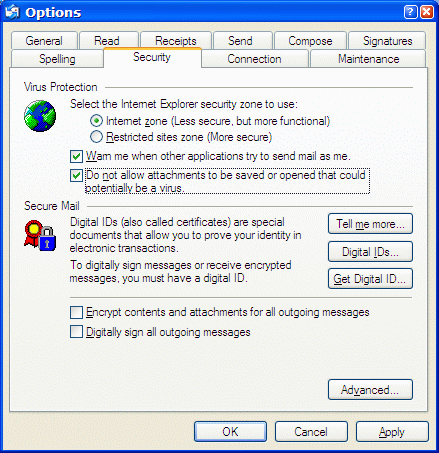
Outlook Express 6 provides enhanced security features which can protect you computer. But these features are not turned on by default. Please refer to the graphic below for visual guidance for both "Tip #1" and "Tip #2" Tip #1 "Don't let your email program be used against you!" Here's how easy it is to set up your computer so that your email program will never send an email without your knowledge. Open Outlook Express, Click TOOLS (at the top) then OPTIONS, then click the Security tab. Put a check mark next to the box that says: "Warn me when other applications try to send mail as me." This will prevent a virus (Trojan) from sending itself to everyone in your address book and potentially infecting them as well. (See Graphic Below) Tip #2 "Don't accidently open or save an attachment that could be dangerous!" If you often receive attachments via email and you don't know what they are: Don't open them. Even if you know the sender, even if the sender is your best friend, do not open or save any attachment, unless you know exactly what the file is and you were expecting it. Another way to prevent any accidental opening of files or attachments is to set Outlook Express up so it won't let you open or save any email attachments. (If you are expecting an attachment you can temporarily disable this setting by reversing the steps shown here.) NOTE:While this tip adds additional protection and should be enabled it is not perfect and does not negate the need for using a good anti-virus program. Place a check mark in the box next to: "Do not allow attachments to be saved or opened that could potentially be a virus". (See Graphic Below)
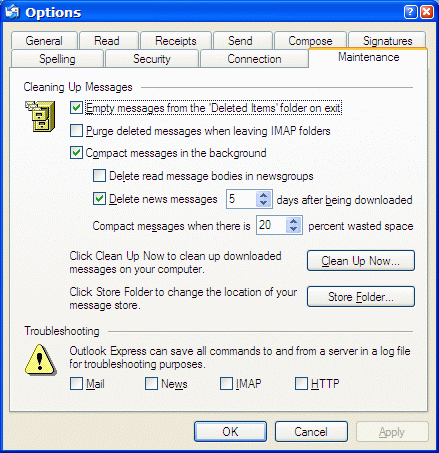
How long has it been since you emptied your Deleted Items folder in Outlook Express? For some of us its been a pretty long time, because we simply forget about it. Here's a solution so you're Deleted Items really get deleted everytime you close Outlook Express! This tip will save you time and free up space on your hard drive too! Click
"Tools" "Options" then click on
"Maintenance" Put a check mark next to: "Empty Messages
from the "Deleted Items" folder on exit." That's all there is to it. You'll
never have to give it another thought! Just make sure that anything you delete
from now on is something you really want to delete!
Information Avenue Home | CloudEight Stationery | Close This Window |
All content is copyright © 2002 by Cloudeight Internet LLC (all rights reserved)