| Add a "Find Message" Button to your Outlook Express
Toolbar
You were
scheduled for a meeting next Thursday. The boss sent you an email last week to remind you
and you forgot to answer her. Now her email is buried in your newer email and you need to
find that letter before you risk demotion or worse! What can you do? Add a "Find
Button" to your toolbar and find that message!
 You can easily find your bosses' email among
among all those love letters :-) and other eamils! And keep your job! When you find it,
don't forget to answer it! You can easily find your bosses' email among
among all those love letters :-) and other eamils! And keep your job! When you find it,
don't forget to answer it!
 Step One: Right
click on an empty part of your Outlook Express toolbar. Step One: Right
click on an empty part of your Outlook Express toolbar.

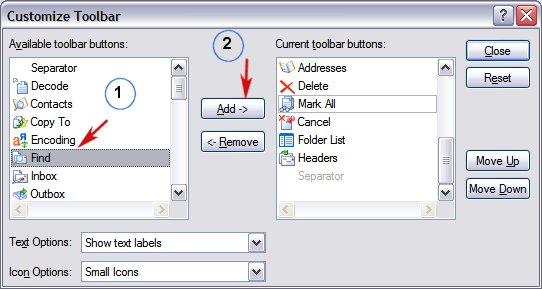
Step Two: Choose "Customize"
Step Three:: Highlight the
"Find" Button and Click Add. Note the "Move Up" and "Move
Down" buttons on the right? You can use these to position your "Find"
button wherever you like. Up being towards the left and down being towards the right. Now
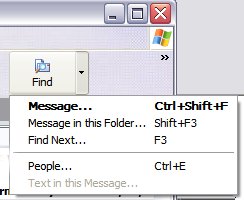
when you click your new "Find" button you'll be able find that email from your
boss and see when the big, boring meeting is. You can search by "Person" or by
subject, by word, or a group of words. Pretty simple, right? You can add as many buttons
this way as you like. But only add the ones you'll use, otherwise things get too crowded
and some of your buttons will be hidden and you'll have to click a drop-down arrow to see
them.
Visit Information Avenue Home
Page | Click here to close this window.
Copyright ©2004 by Cloudeight Internet |