| If someone sends you a file attachment in email, and you are prompted with "Open with" and given an option of many programs to open with, this is how to choose the appropriate program: - First, NEVER open an attachment in your email program; if you receive an unknown file type (or unassociated file type) in email and windows prompts you with "what program to open with", chances are it could be a virus. To keep your system safe, choose to save the file to your desktop or to a folder on your hard drive -then scan it with a good, updated anti-virus program. Never open an attachment directly from email, unless you were expecting it and you are absolutely positive who sent it. Many worms and virus can spoof the "From" address making it appear the attachment came from someone you know and trust. Never assume it came from who it says it came from.
- Next, find the file you saved and scan with an updated virus protection program. Most virus protection programs will allow you to right click the file and scan just the chosen file. As long as file is "clean" proceed to the next step.
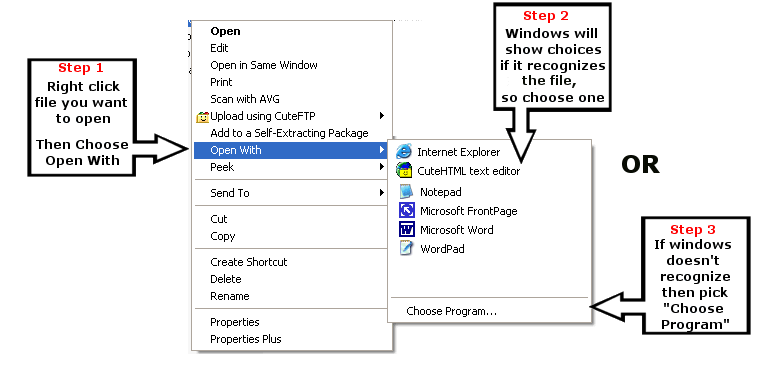
- Right Click the file you want to open, and choose "Open With" (see Step I below). Windows will show you a number of recommend choices (Step 2 below). You can try opening with one of the recommend programs, or you can choose Step 3. Windows will give you more information about the file type and will help you find the software needed to open your file. Go ahead and choose "Choose Program" to get to the next step.
 |
