
Cloudeight InfoAve Weekly
Issue #1157
Volume 23, Number 8
December 12, 2025
Dear Friends,
Welcome to Cloudeight InfoAve Weekly Issue #1157. Thank you for subscribing and for being a part of our Cloudeight family. We appreciate your friendship and support very much! Please share our newsletters and our website with your friends and family.


If you're not getting our InfoAve Daily newsletter, you're missing out on a lot of good stuff!
It's free and it only takes a few seconds to sign up. We'd love to have you with us. Visit this page to sign up for our Cloudeight InfoAve Daily Newsletter.
Christmas Holiday Sale

Cloudeight Direct Computer Care
Repair Keys Are Just $39 Right Now!
You can get a Cloudeight Direct Computer Care Key for just $39 during
our Christmas Holiday Sale! You save over 20% off our regular low price
of $50. Your Cloudeight Direct Computer Care Repair key never expires;
it's good until you use it. It's good for any computer repair that we
can do remotely.
Buy a Cloudeight Direct Computer Care Repair Key for just $39 during our
Christmas Holiday Sale!
Get your Cloudeight Direct Computer Care key for only $39 right
now!

Larry
is
having
problems
with
Gmail
Hi.
This
problem
just
started
a
couple
of
days
ago.
Using
Gmail,
when
I
want
to
move
a
received
email
to
another
folder
and
click
on
the
email
and
then
click
on
Move
To,
it
gives
me
NO
choice
but
sends
it
to
the
first
folder
under
LABELS.
The
only
way
I
can
move
it
to
where
I
want
it
to
go
is
to
DRAG
the
folder
to
the
new
location
folder.
Everything
was
fine
a
few
days
ago;
this
is
something
new.
Our
answer
HI
Larry.
I
don't
know
what
browser
you're
using
to
access
Gmail.
I'm
going
to
assume
Chrome,
but
if
not,
the
following
applies
to
any
browser
you
use
to
access
Chrome.
However,
the
clear
cache
&
cookies
instructions
will
be
different
for
Edge,
Firefox,
or
other
browsers.
Clear
Browser
Cache
and
Cookies
(Most
Likely
Fix)
The
fastest
and
most
common
fix
for
sudden
display
issues
in
web
apps
like
Gmail
is
to
clear
your
browser's
stored
data.
Go
to
your
browser's
settings.
Find
the
option
to
Clear
browsing
data
(usually
under
"Privacy
and
Security"
or
"History").
Select
Cookies
and
other
site
data,
and
Cached
images
and
files.
Choose
the
time
range
"All
time"
and
click
Clear
data.
Restart
your
browser.
Log
back
into
Gmail
to
test
the
"Move
To"
button.
Hope
this
helps,
Larry
----------
Larry
wrote
back:
"Hi
TC...As
usual,
you
guys
are
my
problem
solvers.
5
tests
and
they
all
went
where
they
were
supposed
to.
That
call
for
a
donation...Larry"
Lee
asks
about
BulkCrap
uninstaller
Hi
Darcy
and
TC.
I
have
used
Geek
Uninstaller
for
several
years
and
like
it
very
much.
However,
I
have
just
come
across
one
called
BulkCrap
Uninstaller,
another
free
app
recommended
by a
national
newspaper.
Do
you
know
anything
about
it?
Would
appreciate
your
comments.
Thanks
Lee
Our
answer
Hi
Lee.
There
are
literally
dozens
of
uninstallers
out
there.
We
try
hard
to
recommend
programs
we
trust
and
either
use
or
would
use.
Bulk
Crap
Uninstaller
seems
a
little
too
aggressive,
so
unless
you're
careful,
you
could
end
up
removing
the
wrong
registry
keys.
I
use
HiBit
Uninstaller,
and
have
for
years,
because
it's
safe
and
thorough
enough,
plus
it
also
allows
you
to
remove
multiple
programs
at
once.
I've
been
using
it
not
only
on
my
computers,
but
also
on
computers
I've
worked
on
remotely.
I
don't
see
any
advantages
to
using
Bulk
Crap
Uninstaller.
But
if
Bulk
Crap
works
for
you,
then
that's
what
you
should
use.
We
will
continue
to
use
and
recommend
HiBit
Uninstaller
not
only
because
of
its
uninstaller
function,
but
because
of
its
startup
cleaner,
temp
files
cleaner,
browser
extension
cleaner,
and
other
features
usually
not
found
in
other
uninstallers.
You
can
read
more
about
HiBit
Uninstaller
here.
Hope this gives you some food for thought, Lee.
Sharon wants some free Christmas wallpaper
Would you please suggest a free site for computer Christmas wallpaper? Thanks as always. Stay warm! Sharon
Our answer
Hi Sharon. Here's a site we've recommended in the past and will recommend again before Christmas.

Christmas Holiday Sale
Computer Cleanup, Checkup & Optimization Service
During our special Christmas Holiday Sale, you can buy a Cloudeight Direct Computer Care Cleanup, Checkup, and Optimization service key for just $19! That's right... for just $19...
** We’ll check your computer for malware and questionable programs
** We’ll check and optimize your startup programs
** We’ll check your computer performance to make sure your RAM and CPU usage are within normal ranges
** We’ll check to make sure your Windows settings are configured for the best performance and privacy.
** We’ll review your installed programs and make sure no questionable programs are installed.
Our Christmas Holiday Cleanup, Checkup, and Optimization can help ensure your computer is running at its best.
Take advantage of this special offer before it's gone. Get all the details here.
Our answer
Note: For mobile devices, you typically need iOS 17 or higher or Android 14 or higher to set Bitwarden as the default passkey provider.
Hi TC, I am not very good with computers, and sometimes I can’t figure things out. I have tried to load” Copy to and Move to” on my new computer. I have got your Tutorial right here in front of me, and I cannot figure it out. Is that something you could do for me if I sent you a KEY? If not, I understand.
I read your article on Passkeys vs. two-factor authentication. The biggest problem I am facing is that to use Passkeys, faceprint, fingerprint, whatever, my phone has to have a lock on it. I know, you should always lock your phone. Sometimes, I want it unlocked as to have to keep doing a code, a fingerprint, etc. to open it is very inconvenient. How can you set up Passkeys without it affecting having to have it on your phone? You never used multiple passwords for sites. Can you use the same Passkeys for multiple sites? Thank you for your clarification.
The Device Link: Since the Private Key is generated and stored on a specific device, the ability to log in is tied to possession of that device.
>
Christmas Holiday Sale
Cloudeight Direct Computer Care Repair Keys Are Just $39 Right Now!
You can get a Cloudeight Direct Computer Care Key for just $39 during our Christmas Holiday Sale! You save over 20% off our regular low price of $50. Your Cloudeight Direct Computer Care Repair key never expires; it's good until you use it. It's good for any computer repair that we can do remotely.
Buy a Cloudeight Direct Computer Care Repair Key for just $39 during our
Christmas Holiday Sale!
Get your Cloudeight Direct Computer Care key for only $39 right
now!

Did you know that online scams triple during the holiday season?
Just about every week, we get several emails from people who have fallen for an online scam – especially a computer repair scam. They have given their credit card information and access to their computers to criminals, and it usually starts with a phone call. It goes like this. The phone call comes unexpectedly, and out of the blue, the computer user is informed that their computer is infected with something and/or is sending and spreading malware or viruses and infecting other computers. Of course, the caller has the cure — the fix — the solution.
Sadly, many people fall for this and give access to their computers to these scammers, who then connect to the customer’s computer and proceed to ” fix” it. But they don’t fix it. Many times, they install worthless software or software anyone can get free, or worse, they install malware to steal your passwords and usernames, and thus, access to your bank accounts and other highly sensitive and personal information. Users give the criminals their credit card information, and in the best-case scenario, they are charged a few hundred dollars — in the worst cases, their card numbers are stolen and used to make purchases and/or steal identities.
We warn you again — never give ANY information to anyone who calls you out of the blue, no matter who they say they represent. One of the biggest scams is the one where the caller identifies himself or herself as a Microsoft employee, telling you that your Windows computer is infected with malware and that your computer is infecting other computers on the Internet. If you have caller ID, their number may show that they are calling from a Microsoft number — but they’re not. It’s really easy to spoof a caller ID.
Remember this: No legitimate company is going to call you out of the blue and tell you that your computer is infected. NONE. NADA. ZERO. If you get a call from someone claiming to be from Microsoft or some other legitimate-sounding company, hang up. Do not give them access to your computer. Do not give them your credit card number. Do not give them any passwords.
We have published this advice before, yet every week we get several people who come to us for help after falling for a scam. And we help them by removing all the malware installed by the scammers and fixing things these scammers intentionally broke (so they can come back again and get more money from you).
So if you remember nothing else from this tip, remember this:
If you get a call from anyone claiming to be from Microsoft or some other legitimate-sounding company — or someone who tosses around complex computer terms and claims he or she can fix your computer — hang up. Hang up the phone and do not give them any information. none. nada. zero. If they continue to call after this report them to your phone company and/or your local authorities. The important thing is: Never give your information to anyone who calls you out of the blue, telling you that you have problems with your computer. Never give access to your computer to anyone who calls out of the blue and warns you that your computer is infected. It’s always a scam – always.
If you are one who has already fallen for this scam, call your credit card company right away and tell them what happened. Tell them you were scammed and have the charges removed from your credit card. You should be able to get charges made by scam companies removed from your credit card. If you wish, you can report it to your local authorities, although we doubt it will do much good. Scammers are professional crooks, and they are not going to operate under the same name or from the same location or use the same methods for very long. They’re going to move around, change names, and change schemes, and it’s very hard to catch up with them.
Artificial Intelligence is making scams even harder to recognize
Artificial intelligence has given scammers a tool they can use to vastly improve the scale and realism of social engineering attacks, making them harder than ever to detect. Generative AI tools allow criminals to create flawless phishing emails that are free of grammatical errors and highly personalized, bypassing common spam filters and overcoming a key indicator of old scams. More alarmingly, deepfake technology can clone a person’s voice from mere seconds of audio or create ultra-realistic video of a loved one or a corporate CEO, which criminals use to stage convincing “virtual kidnapping” or urgent financial transfer scenarios that exploit a victim’s trust and sense of urgency. By automating the creation of believable fake websites, professional product images, and engaging fake personas for romance scams, AI lowers the barrier to entry for fraudsters, exponentially increasing the number of sophisticated, targeted attacks that consumers must now guard against.
Here is some good information from the U.S. government (and no, we are not being sarcastic!)
” …If You Get a Call
If you get a call from someone who claims to be a tech support person, hang up and call the company yourself on a phone number you know to be genuine. A caller who creates a sense of urgency or uses high-pressure tactics is probably a scam artist.
Keep these other tips in mind:
- NEVER give control of your computer to a third party who calls you out of the blue.
- Do not rely on caller ID alone to authenticate a caller. Criminals spoof caller ID numbers. They may appear to be calling from a legitimate company or a local number when they’re not even in the same country as you.
- Online search results might not be the best way to find technical support or get a company’s contact information. Scammers sometimes place online ads to convince you to call them. They pay to boost their ranking in search results so their websites and phone numbers appear above those of legitimate companies. If you want tech support, look for a company’s contact information on their software package or on your receipt.
- Never provide your credit card or financial information to someone who calls and claims to be from tech support.
- If a caller pressures you to buy a computer security product or says there is a subscription fee associated with the call, hang up. If you’re concerned about your computer, call your security software company directly and ask for help.
- Never give your password on the phone. No legitimate organization calls you and asks for your password.
- Put your phone number on the National Do Not Call Registry, and then report illegal sales calls.
How to Spot a Refund Scam
If you paid for tech support services, and you later get a call about a refund, don’t give out any personal information, like your credit card or bank account number. The call is almost certainly another trick to take your money. The refund scam works like this: Several months after the purchase, someone might call to ask if you were happy with the service. When you say you weren’t, the scammer offers a refund. Or the caller may say that the company is going out of business and providing refunds for “warranties” and other services. In either case, the scammers eventually ask for a bank or credit card account number. Or they ask you to create a Western Union account. They might even ask for remote access to your computer to help you fill out the necessary forms. But instead of putting money in your account, the scammers withdraw money from your account. If you get a call like this, hang up, and report it at http://ftc.gov/complaint …”
See, we told you — the U.S. government has some good advice for you to follow, no matter where you live. Don’t get scammed. We hate to see any of you being taken advantage of by charlatans and criminals. You can read more tips here.
During the holiday season, the number of scams triples. Don’t let a scammer ruin the holidays for you.
- Think before you click.
- Be wary.
- Always use common sense.
- When shopping online, don’t hurry.
- If you’re in doubt about something, don’t do it. You can always go back and do it later.
- Don’t trust any text messages unless you know the sender or were expecting the text.
- NEVER click links in emails from banks, credit cards, online payment sites, or any financial institutions asking you to click a link to change your password, personal information, or anything else. No legitimate financial institution, bank, online payment service, or credit card company will ever ask you to do that. They may ask you to log into your account but never “click this link” to log into your account.
How to Manage Your Browser Extensions
Windows 10 / Windows 11 and Firefox, Chrome, or Edge
I think all of us get a little extension crazy sometimes. Sometimes you think you need an extension, and so you add it to your browser, and before you know it, you have 10-15 browser extensions. Most people can’t even remember the extension they’ve added. There’s nothing wrong with extensions – at least not the legitimate ones – but having too many extensions can slow down your browser. So, we recommend that you take a look at your browser extensions every so often and remove any that you don’t use or don’t need.
There’s an easy way to do it, too, regardless of which browser you use. And it’s all thanks to the puzzle-piece icon that almost all popular browsers, including Chrome, Firefox, and Edge, have adopted.
Manage your browser extensions the easy way.
1 > Open your browser and locate the “puzzle-piece” icon in the toolbar.

2 > Click on the puzzle-piece icon and click on “Manage extensions” in the drop-down menu.

And you’ll see this:

Above: Chrome extensions
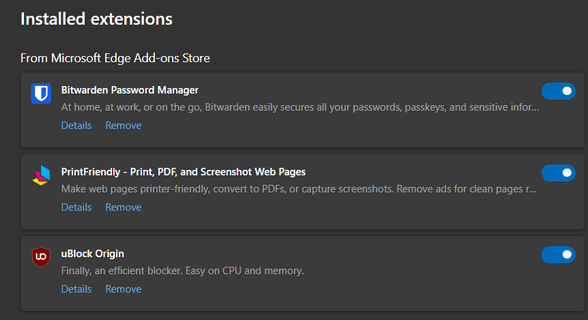


Above: Mozilla Firefox extensions
All browsers give you the option to turn off extensions or remove them – either option has the same effect. The fewer extensions you have, the faster your browser will be.
So, take some time today to check out the extensions you’ve installed and turn off or remove any that you don’t use.
Please Be SUPER Careful Whenever You Search!
A Tip for Everyone
There are two things you should never search for and those are "support" and "drivers". Many people have gotten into serious trouble by searching for these. The reason? Criminals and scammers know that people will search for things like HP Printer Support, Canon Printer Support, Dell Support, Display drivers, printer drivers, and so on. These search terms are full of danger for you. Why? Because the unscrupulous know you will be searching for these things and will make ad buys on search engines so their scummy ads will show up on your search results. Once you click on one, you could easily find yourself in a trap or worse, thinking you’re on a legitimate site when you’re not.
If you need help with your printer, type in the site’s web address, for instance, http://www.hp.com/ or https://www.canon.com. If you need help, click on support. If you need support for Windows, don’t go searching for Microsoft support. Go to www.microsoft.com and click on support.
If you need drivers, don’t search for anything using the word drivers. If you have an NVidia display adapter that you need drivers for, go to NVidia’s website. If you need help with a Dell computer, go to Dell’s website.
If you must search for anything having to do with a driver or product support, remember this – only the name before the dot.com or dot.net or dot.org, dot.biz, or dot.tv, etc. in a URL (website address) is the actual domain.
For instance, the following web address is not for Dell support: dell.support.geeksrus.com.
It is not a Dell site at all – it’s a geekrus site.
Likewise, mircosoft.support.wegotcha.com is not a Microsoft site – it’s a wegotcha site, and if you click on a link like that, believe me, they gotcha!
Let’s take a test:
1.) Which of the following 3 URLs belongs to Microsoft?
A. microsoft.support.com
B. support.microsoft.com
C. microsoft.windows-support.com
Answer? Only “B” is a Microsoft Site.
2.) Which of the following belongs to HP?
A. hp.com
B. support.hp.com
C .hp-drivers.softonic.com
D. hp-printer.drivers.com
If you said “A” and “B,” you’re right. Both A and B are HP sites. C and D are not. If you learn how to read a URL you’re on the way to safer browsing – and searching.
Be careful what you search for and learn how to read URLs (website addresses). Always pay attention to the words/names right before the dot com, dot net, dot. org, etc. in a URL (website address).

Want more tips, tricks, and information?
We have thousands of Windows tips, tricks, and more on our InfoAve website.
Subscribe to our free InfoAve Daily newsletter.

Your gifts help us to keep on helping you and all our friends. Please consider making a small donation today!

Thousands of Free Christmas and Holiday Fonts for You!

Christmas Day is on the way – it will be here sooner than you think. If you’re making special Christmas cards, Christmas graphics, gift tags, place settings, or other Christmas projects, you might be looking for Christmas and seasonal holiday fonts.
We’ve got you covered! We found thousands of free (for personal use) Christmas and holiday fonts you can download and use right now.
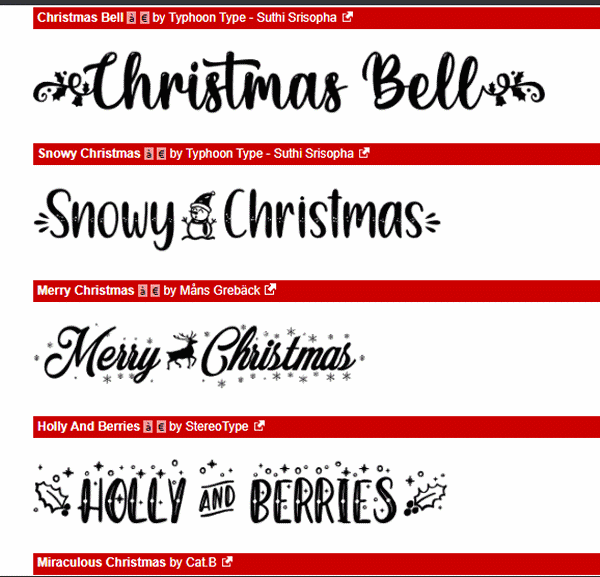
Above: Christmas fonts from dafont.com.
The three Christmas and holiday font collections we’re featuring today contain a plethora of styles and designs, so you are certain to find just the right fonts for your projects.

Above – Christmas fonts from Fontspace…

Above: Christmas Fonts from 1001 Fonts…
No matter what type of Christmas/Holiday fonts you’re looking for, from script to decorative, you’ll find them on our two site picks.
There are a lot of font sites, but sadly, many of them like to play games – some even try to get you to install malware or software you don’t want or need. The two sites we recommend do not play games, and when you download the font, you get the font and no malware or sneaky bundled software.
Almost all (but not all) the fonts on our three site picks are free for personal use. But you may find a few that are trialware. donationware or shareware… check the text file that comes with the font before using the font.
Check out dafont.com’s Christmas fonts
Check out Fontspace’s Free Christmas Fonts
Check out over 1400 Free Christmas Fonts at 1001 Fonts
Christmas Holiday Sale
Computer Cleanup, Checkup & Optimization Service
During our special Christmas Holiday Sale, you can buy a Cloudeight Direct Computer Care Cleanup, Checkup, and Optimization service key for just $19! That's right... for just $19...
** We’ll check your computer for malware and questionable programs
** We’ll check and optimize your startup programs
** We’ll check your computer performance to make sure your RAM and CPU usage are within normal ranges
** We’ll check to make sure your Windows settings are configured for the best performance and privacy.
** We’ll review your installed programs and make sure no questionable programs are installed.
Our Christmas Holiday Cleanup, Checkup, and Optimization can help ensure your computer is running at its best.
Take advantage of this special offer before it's gone. Get all the details here.

Christmas Memories
It’s officially Christmastime. Even for those like me who find the commercial frenzy that drives retailers to start Christmas on Halloween upsetting, Christmastime is here. Unfortunately, many have allowed their greed to overshadow the Christmas spirit and diminish some of the joys of the season by starting Christmas in October. Nonetheless, there are only a few more days left until Christmas, and it seems like the Christmas Spirit is still eluding me, but maybe it’s my own fault. I wonder.
We’ve allowed Christmas to become a season of controversy. Some public officials won’t dare call Christmas lights – Christmas lights. Some towns won’t decorate their lampposts and town squares with decorations and festive lights – they fear it will upset some atheist, Jew, Muslim, or other non-Christian. Some store clerks are ordered by their employers to say “Happy Holidays!” instead of “Merry Christmas”. It seems like the Christmas Spirit is alluding me. I wonder if it’s just me. Is it my fault?
Somehow, I’ve allowed Christmas to become tainted by commercialism, secularism, and politics- but it doesn’t have to be this way. I’m becoming quite sure of that...
We hope you'll read the rest of this essay here.

What is Porch Piracy?
Porch Piracy, the theft of delivered packages from a residence's front steps or porch. It has become a major challenge that has exploded along with online shopping. These opportunistic thieves, often dubbed "porch pirates," seize on packages left unattended by delivery drivers.
Porch Piracy is widespread and costly. Tens of millions of packages are stolen annually in the U.S., resulting in billions of dollars in consumer and retailer losses. While the crime can occur year-round, incidents surge significantly during the busy holiday season.

Sales of the following products and services help support our newsletters, websites, and free computer help services we provide. MORE IMPORTANT STUFF!
Cloudeight Direct Computer Care:
Single Keys, SeniorPass, or Season Tickets - always a great deal. Cloudeight Direct Computer Care is like having PC insurance.
Get more information here.
Emsisoft Anti-Malware: Emsisoft is the only Cloudeight-endorsed and recommended Windows security program. It provides users with a complete antivirus, antimalware, anti-ransomware,
and anti-PUPs solution. We offer single Emsisoft licenses and multi-computer licenses at discount prices. Also, we offer our exclusive Emsisoft with Cloudeight installation & setup.
Get more information here.
Reg Organizer: Reg Organizer is the Swiss Army Knife of Windows tools. It's far more than just a registry optimizer and cleaner... it's a Windows all-in-one toolkit. Reg Organizer helps you keep your computer in tip-top shape and helps you solve annoying Windows problems. Reg Organizer works great with Windows 10
and Windows 11! Get more information about Reg Organizer (and get our special discount prices) here.
Your InfoAve Weekly Members' Home Page is located here.
Help us grow! Forward this email newsletter to a friend or family member - and have them sign up for InfoAve Weekly here!
Get our free daily newsletter! Each evening, we send a short newsletter with a tip or trick or a computer-related article - it's short and sweet - and free. Sign up right now.
We have thousands of Windows tips and tricks and computer articles posted on our Cloudeight InfoAve website. Our site has a great search engine to help you find what you're looking for, too! Please visit us today!
Help us by using our Start Page. It costs nothing, and it helps us a lot.
Print our Cloudeight Direct Flyer and spread the word about our computer repair service! If you want to help us by telling your friends about our Cloudeight Direct Computer Care service, you can download a printable flyer that you can hand out or post on bulletin boards, etc. Get the printable PDF Cloudeight Direct Computer Care flyer here.

We'd love to hear from you!
If you have comments, questions, a tip, a trick, a freeware pick, or just want to tell us off for something, let us know.
If you need to change your newsletter subscription address, please see "Manage your subscription" at the very bottom of your newsletter.
We received hundreds of questions for possible use in IA news. Please keep in mind that we cannot publish all questions and answers in our newsletters, but we try to answer every single question. We can only use a few in each week's newsletter. If you have a support question about a service or product we sell, please contact us here.
Subscribe to our Daily Newsletter! Get computer tips & tricks every night. Our daily newsletter features a computer tip/trick or two every day. We send it out every night around 9 PM Eastern Time (USA). It's short and sweet, easy to read, and FREE. Subscribe to our Cloudeight InfoAve Daily Newsletter!
We hope you have enjoyed this issue of Cloudeight InfoAve Weekly. Thanks so much for your support and for being an InfoAve Weekly subscriber.
Have a great weekend. Be safe!
Happy Holidays & Merry Christmas!
Darcy & TC
Cloudeight InfoAve Weekly - Issue #1157
Volume 23, Number 8
December 12, 2025
Not a subscriber? Subscribe to our FREE Cloudeight InfoAve Weekly Newsletter here.
"Cloudeight InfoAve Weekly" newsletter is published by:
Cloudeight Internet LLC
PO Box 73
Middleville, Michigan, USA 49333-0073
Read our disclaimer about the tips, tricks, answers, site picks, and freeware picks featured in this newsletter.
Copyright ©2025 by Cloudeight Internet